Tuesday, November 8, 2011

Linux Mint Redesigns GNOME 3

I may get my partly-fried desktop back in a while, so I may be aggressively trying out lightweight distributions again in the near future.

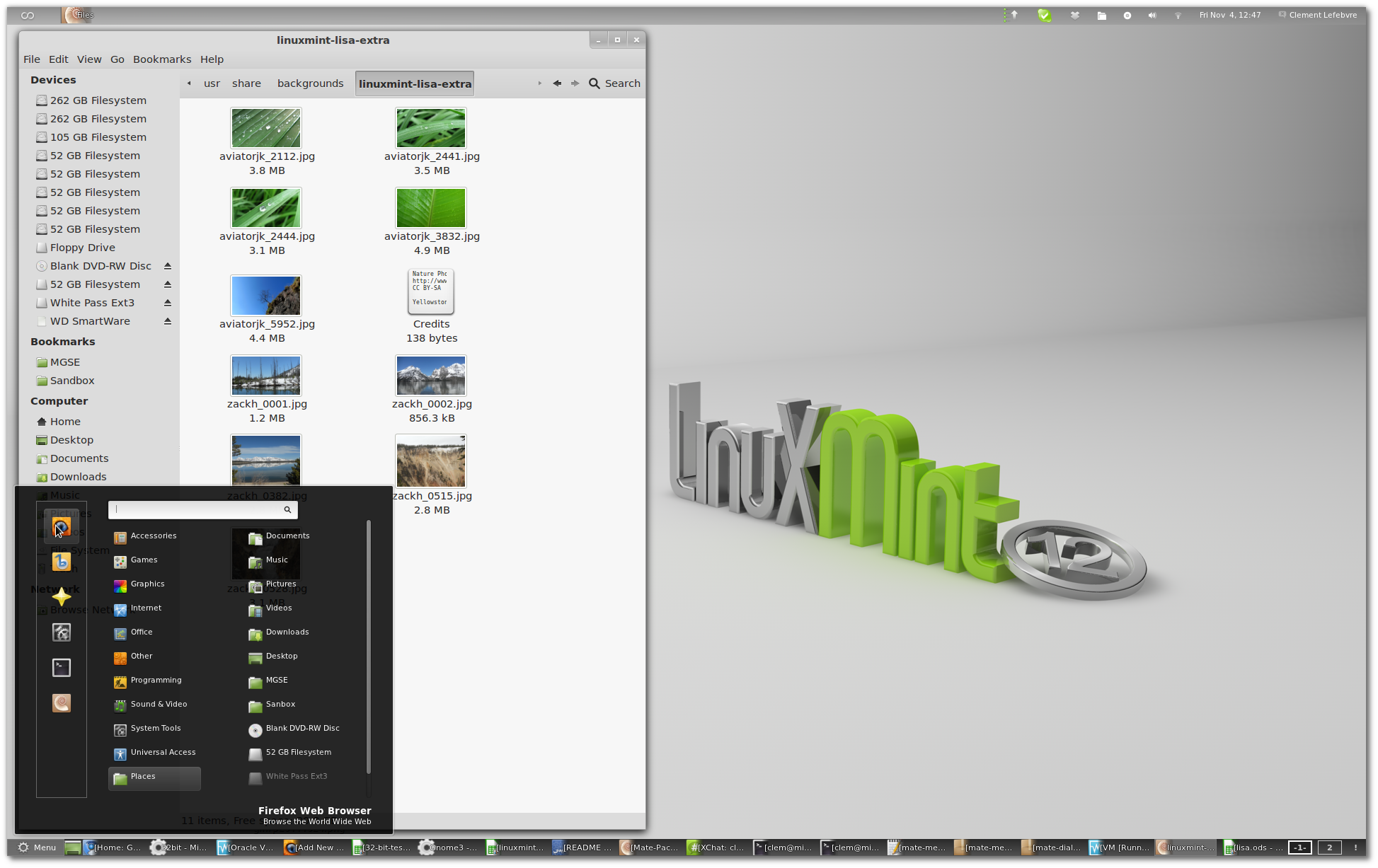
Meanwhile, on an off-topic note, I really admire what the Linux Mint team plans to do with GNOME 3 in Linux Mint 12. Here's a screenshot of their GNOME 3 design, posted on The Linux Mint Blog:

GNOME 3 with MGSE in Linux Mint 12

The major innovation is the introduction of Mint GNOME Shell Extensions (MGSE), a series of desktop add-ons that can be enabled or disabled to suit the user's comfort level with standard GNOME 3. With all MGSE features enabled, Mint 12 looks like the kind of GNOME 3 desktop I can live with. My single biggest complaint about GNOME 3 when I recently tried it in Sabayon 7 was the lack of a window list. It was really annoying to have to click the Activities button in the top left corner to switch between open windows. If you can create desktop or panel shortcuts in the MGSE-modified desktop, I may really enjoy Linux Mint 12.

My only real problem with GNOME 3/MGSE is the two-panel configuration that I used to always eliminate in GNOME 2 whenever a distro used it. Vertical space is at a premium on my laptop.

Though I've been using Linux Mint Debian Edition on the laptop for a while, I may have to check out the Linux Mint 12 main edition when it comes out.

The Linux Mint Blog » Blog Archive » Linux Mint 12 Preview:

'via Blog this'

Sunday, September 18, 2011

Taking User-Friendliness Lessons From Microsoft

When I first heard about the new graphic interface for Windows 8, I thought Microsoft was making the same mistake  the Ubuntu and GNOME developers have recently made: putting a touchscreen interface on an OS that will also run on non-touchscreen devices. However, according to Jeff Hoogland, it looks like Microsoft is at least making it easy to go back to a standard desktop interface.

Thoughts on Technology: Something Gnome3 and Unity Could Stand to Learn From Windows 8

I never thought I'd see the day when Linux desktops are being schooled on usability by Microsoft.

Wednesday, September 14, 2011

Lubuntu 11.10 Software Center

According to Softpedia, the next version of Lubuntu, the LXDE-based variant of Ubuntu, will feature the Lubuntu Software Center, a user-friendly package management tool modeled after the one in the main edition of Ubuntu. The link below includes instructions for how to install the Lubuntu Software Center from the Lubuntu Desktop PPA, if you are inclined to test beta software.
http://news.softpedia.com/news/Introducing-Lubuntu-Software-Center-221531.shtml

Tuesday, August 16, 2011

Distro Release: Linux Mint 11 LXDE

According to DistroWatch, the Linux Mint team has released the LXDE edition of Linux Mint 11. It looks like the major changes are to the appearance of a lot of applications, particularly the Software Manager. According to Linux Mint project leader Clement Lefebvre:
The Software Manager - many improvements were made to its graphical interface, and the Software Manager now looks much more polished. Application screens were visually improved, not only in the way they look but also in their layout and the information they show.
I'm surprised we're actually seeing this particular edition of Mint. I thought they were converting all their non-GNOME editions to rolling releases with a Debian code base.

Distribution Release: Linux Mint 11 "LXDE" (DistroWatch.com News)

DistroWatch Weekly No. 418 Highligts

It's that time of week again (though I've missed the last couple of issues). The highligts of this weeks DistroWatch Weekly for for fans of lightweight distributions include:

  • Toorox "Xfce" and "Lite" versions. Apparently, Toorox is a Gentoo-based distro. Despite the naming, both of these versions have Xfce as the default desktop. However, the Lite version swaps out several resource-hungry applications for lighter alternatives.
  • ConnochaetOS. This is a superlight distro intended to run on old computers (as little as 64 MB of RAM on a Pentium I processor).
  • Puppy Linux 5.1.3 "Wary." The Wary version of Puppy Linux is also supposed to be optimized for very old computers.
  • WattOS R4. I had already spotted this one and written a brief post about it. However, DistroWatch Weekly thoughtfully included a screenshot of the default desktop. Insectophobes beware. 

DistroWatch Weekly No. 418.

Sunday, August 14, 2011

Distro Release: WattOS R4

WattOS is one of my favorite lightweight distributions, despite a few minor quibbles about configuration options. Yesterday, the newest version, wattOS R4, was released. Among the changes are a "control panel user interface for simple configuration of your system in a familiar format" and a couple of changes to lighter software defaults, most notably switching from Firefox to Chromium as the default browser. 

I also like the new logo wattOS has adopted. It goes better with the default color scheme (assuming the default theme is still green-based) and may not look quite as awkward as part of the menu button.

PlanetWatt - wattOS R4

Sunday, August 7, 2011

Distro Release: Tiny Core Linux 3.8

A new version of Tiny Core Linux has been released. It looks like most of the changes in version 3.8 are stability fixes and alterations to make the graphic interface more efficient.

http://forum.tinycorelinux.net/index.php?topic=11017.0

Thursday, August 4, 2011

The Shot Heard Round the World

Linus Torvalds, the creator of the Linux kernel, has switched from GNOME to Xfce following the release of GNOME 3. At first glance, this looks like a major endorsement for Xfce. However, I'm not sure how much effect this will have on everyday Linux users, since Torvalds's reasons for leaving GNOME are pretty geeky:

Here's an example of "the crazy": you want a new terminal window. So you go to "activities" and press the "terminal" thing that you've made part of your normal desktop thing (but why can't I just have it on the desktop, instead of in that insane "activities" mode?). What happens? Nothing. It brings your existing terminal to the forefront.
That's just crazy crap. Now I need to use Shift-Control-N in an old terminal to bring up a new one. Yeah, that's a real user experience improvement. Sure.

Linus Torvalds Ditches GNOME For Xfce

Tuesday, July 26, 2011

Distro Release: Zorin OS 5 Lite

Ubuntu Look has announced the release of Zorin OS 5 Lite. From what I could gather from a brief look around the Zorin OS site, it looks like Zorin OS is a derivative of Ubuntu that uses a more Windows-like desktop configuration and some unique features like a "Look Changer," and also includes proprietary media codecs.

It looks like the most significant difference between Zorin OS and Linux Mint is that Zorin OS comes in multiple free and paid versions. The free versions are Core, Lite, and Educational. The paid versions are optimized for purposes like business and gaming.

The Lite version uses Lubuntu as its base and features the LXDE desktop. On the one hand, I'm tempted to try this distribution. On the other hand, there are things about their marketing approach that annoy me. For example, their download page urges users to download the live disc using Firefox because "other browsers may corrupt the file and may cause errors." Since I've downloaded multiple distros in Chromium and Iron, I'm skeptical of that claim. This one's going to the bottom of my review queue, meaning I may get around to it after I've finished my current project and have reviewed every other distro I find remotely interesting.

Ubuntu Look » Zorin OS 5 Lite is now available

Tuesday, July 19, 2011

DistroWatch Weekly No. 414

The biggest news about lightweight distributions in this week's DistroWatch Weekly is the release of several versions of Sabayon Linux 6 featuring lightweight desktops:
Fabio Erculiani has announced the availability of three new Sabayon Linux 6 spins, featuring the Enlightenment 17, LXDE and Xfce desktops....
Apparently, the LXDE version is supposed to be for older computers, the Xfce version for users seeking an alternative to GNOME 3 and Unity, and the Enlightenment version for adventurous users.

Aptosid is another lightweight distro released last week. It's based on Debian unstable and features the KDE and Xfce desktops.

Finally, PagugLinux 11.1, a "minimalist, Gentoo-based live CD featuring the Fluxbox window manager," was released.


DistroWatch Weekly, Issue 414, 18 July 2011

Wednesday, July 6, 2011

Distro Review: Debian With Xfce

This review will be shorter than most and won't have any screenshots. That's because my troubles installing certain spins of PCLinux OS (which will be detailed in an upcoming review, along with that distro's positve features) forced me to wipe Debian from my desktop's hard drive. However, I did use Debian with Xfce long enough to notice a few things about it.


Installation

Installing Debian is easy and painless. The only minor inconvenience is that you can't install Debian from a live CD like you can Ubuntu and other distributions.


Pros

Speed. Debian with Xfce runs much smoother and faster than Xubuntu. In fact, it feels a lot like Crunchbang. This isn't surprising, since Crunchbang's developer has said that its Xfce version is little more than Debian with the Xfce desktop and a few custom packages installed.

Fonts. I'm not sure why, but Debian with Xfce seems to display fonts slightly better than Crunchbang. Neither displays fonts as smoothly as Ubuntu, but Debian seems to avoid some of the ugliest font rendering bugs of Crunchbang, especially in the Chromium browser.


Cons

Old Software. If you use the stable version of Debian, your software will become outdated (if it isn't already) unless you add third-party repositories to keep your favorite programs current. The most egregious example of this flaw is Debian stable's version of Chromium (still at 6 when Google just released version 12).

This problem can be reduced by installing Debian's testing or unstable versions. However, those versions, as their names imply, are less stable than the main version. My experience with distros based on Debian testing indicates that it's pretty stable, but your mileage may vary.

Dropbox. I was unable to install Dropbox on Debian with Xfce because of unsatisfiable dependencies. This is a huge difference with Crunchbang Xfce, which installed Dropbox with no problems. It's possible that you might be able to work around this problem by installing the main GNOME-based Debian Live CD and leaving GNOME dependencies installed after installing Xfce. However, this strategy risks losing some of Xfce's speed. Given Dropbox's recent security problems, some users may not object to this problem.


Overall Impression

Debian with Xfce is a fast, smooth combination. However, you may have problems installing some software. If you don't mind jagged font displays, you might find Crunchbang a better fit, as it seems to have fewer of these problems.
Monday, July 4, 2011

DistroWatch Weekly #412

There are two lightweight distribution highlights in this issue of Distrowatch Weekly:

  • Lightweight Portable Security (LPS) 1.2.1. This is supposed to be a secure live CD that allows military members and others concerned about privacy and security (it's available to the public for download) to surf the web and work on confidential documents without worrying about compromising vital information. Ironically, LPS automatically logs its user in as root.
  • Bodhi Linux for ARM processors. Jeff Hoogland has announced an alpha release of a version of Bodhi Linux for touchscreen devices running ARM processors. Unlike the standard version of Bodhi, this spin is based on Debian, not Ubuntu.

Sunday, July 3, 2011

Peppermint OS Review in Linux Journal

Michael Reed of Linux Journal has written a review of Peppermint OS Two. His conclusion:

In summary, Peppermint Two is a respin of Lubuntu 11.04 with the addition of cloud application integration features. The default application set is biased towards software which is lightweight and fast.

When setting up the distribution up for personal use, its success probably depends on the preferred working style of the user. A user who makes a lot of use of web-based applications might appreciate being able to give them greater parity with traditional applications. An administrator might appreciate the ability to offer users a lightweight desktop with the addition of cloud applications in a consistent and easy to explain overall package.
The full review goes into some detail about the system for setting up web applications on Peppermint's desktop. Personally, I'm still not sure if the ability to open a Chromium window dedicated to Gmail is better than just opening the browser and going to Gmail, especially if you have a webmail notifier extension.

Peppermint OS: Cloud Oriented Desktop Distro | Linux Journal

Thursday, June 16, 2011

Distro Release: Tiny Core Linux 3.7

It seems like only yesterday (though it was actually last month) that I wrote a brief post about the release of Tiny Core Linux 3.6. Today, version 3.7 came out. It looks like this distribution has grown in the last month. Several of the new features in this point release make it a lot easier to dual boot with Windows on a desktop. Specifically, there seem to be a couple of packages that allow read and write access to NTFS (Windows Vista/7 file format) partitions. Apparently, Tiny Core Linux is no longer just for running from live media.

Distribution Release: Tiny Core Linux 3.7 (DistroWatch.com News)

Wednesday, June 15, 2011

Bodhi Linux Review on Techworld

Rohan Pierce of TechWorld Australia has posted a review of Bodhi Linux. He's not impressed:
In the end we were somewhat underwhelmed by the end user experience
though. Bodhi can be very pretty to look at, and you can make it even
prettier if you take the time, but these days I find myself longing for
super-minimalist desktops with a focus on staying out of the way (of
course, Bodhi can be made to be this as well, if you are interested in
learning the ins and outs of Enlightenment). The simplicity of the
default installation is great — I don't like being overloaded with apps.
But there was just not enough there to hold my interest — I'd rather
install CrunchBang and customise Openbox.
It seems to me that Pierce didn't pay much attention to the instructions when installing Bodhi. When you are prompted to select your starting profile, one of the choices is a minimalistic setup even leaner than Crunchbang's default Openbox configuration. You can start with nothing but one gadget -- either a clock or system monitor; I can't remember which -- and build your desktop from scratch, with or without a single panel.

To be fair, Pierce does complain about a few egregious bugs and some problems with Bodhi's default laptop layout on a netbook. Most of these problems are probably hardware related, but a reviewer is limited by the hardware they have available for testing. But the main reason he lists for preferring Crunchbang (though it is an excellent distro) over Bodhi seem strange.

Bodhi Linux review - ubuntu, open source, Linux - Open Source - Techworld


Tuesday, June 14, 2011

Distribution Release: AV Linux 5.0

From Distrowatch:
Glen MacArthur has announced the release of AV Linux 5.0, a Debian-based distribution with a collection of audio and video production software and running on the LXDE desktop: "After more than five months of daily development following the release of 4.2, AV Linux 5.0 is here. This release balances the rock-solid reliability of Debian's stable release and fortifies it with some carefully selected packages to make it a state-of-the-art multimedia content creation powerhouse...."
Obviously, this distro looks like it's using LXDE to leave room for resource hungry audio and video applications rather than to run the OS on older computers. Since multimedia editing isn't my thing, I won't be reviewing this one, ever. However, it may be of interest to some people who stumble on this blog.

AV Linux 5.0 Release Announcement on Distrowatch

Sunday, June 12, 2011

Distro Review: wattOS R3

WattOS is an Ubuntu-based distribution designed to run on old computers with limited memory and/or slow CPU speed. It's also designed to have a minimalist interface while minimizing the need to use the terminal. (Developer Ron Ropp, a.k.a. "Biff Baxter" on the WattOS website, describes the goals of WattOS in this Linux Journal interview.


Installation

WattOS uses a LiveCD, which allows you to try it before installing it on your system. It uses the Ubuntu installer, so it's painless to install the OS from the LiveCD. The only possible problem may be setting up a dual boot with Windows 7, which may require you to create a partition before installation using either Windows 7's partitioning tool or GParted (which is available on the LiveCD).


Pros

Fast bootup. WattOS is quick to start up, particularly after login. On my 1GB desktop, the complete LXDE interface appears almost instantaneously once I type my password and hit Enter. It only takes a split second for all the system tray icons to appear.

Simple default layout. WattOS's default layout looks similar to a Windows desktop with the taskbar on the bottom.

The WattOS default desktop
The word "Go" on the menu button is similar to Windows' "Start," and the launchers to its right look a lot like the Quick Start area from previous versions of Windows. Finally, the LXDE system tray sits exactly where the Windows system tray would be. The only difference is the Ubuntu-style shutdown button at the far right. This configuration is simple and easy for converted Windows XP users to grasp.


Cons

Puzzling default software. Most of WattOS's default software choices are sensible, like the standard inclusion of AbiWare and Gnumeric instead of OpenOffice or LibreOffice. However, GIMP also comes preinstalled even though wattOS also includes Fotoxx, a lightweight photo manager with the standard crop and scale functions.

No Openbox configuration manager. Though wattOS includes LXDE's "Customize Look and Feel" dialog box, the Openbox configuration manager doesn't come preinstalled. This means that you can change the desktops GTK widget theme but not the appearance of window borders, even to change the window title font. This problem is easily solved by downloading the obconf package in Synaptic or typing  sudo apt-get install obconf in the terminal. However, it seems like an odd exclusion for a distro that wants to minimize terminal use. Then again, Ropp might assume that the average user doesn't care about customizing the desktop as long as everything works.

No Automatic Updates. In wattOS, you must open Synaptic and click the Mark All Upgrades button to get updates for your installed software. Users who are used to Ubuntu and other distros that notify them of package upgrades may forget to do this, which could result in the inconvenience of outdated software and possibly security problems. However, if wattOS issues a new release with every new Ubuntu version, these problems can be minimized.


Overall Impression

While it has a few quirks that may annoy some users, wattOS is an excellent distro for machines with limited resources. For users who want a light, fast OS and who don't care much about customizing their desktop's appearance, it's the ideal OS.
                                               

Saturday, June 11, 2011

Puppy Linux With Enlightenment

Macpup looks interesting: Puppy Linux 5.25 + the Enlightenment desktop + Firefox 4. Lucid Puppy had a pretty good-looking default desktop, and Enlightenment looks incredibly slick for a lightweight desktop, based on my experience with Bodhi Linux. Therefore this distro could combine performance with beauty in a way that only Bodhi has before.

Distribution Release: Macpup 525 (DistroWatch.com News)

Friday, June 10, 2011

Distribution Release: Peppermint OS Two (DistroWatch.com News)

Peppermint OS Two has been released. This is the second version of the cloud-centric, Ubuntu-based distribution. It looks like the new version is specifically based on Lubuntu but uses the Openbox window manager alone rather than the complete LXDE desktop.

Distribution Release: Peppermint OS Two (DistroWatch.com News)

Thursday, June 9, 2011

MSNBC.com Videos Don't Work on Unity

Doug Roberts of Linux Journal wrote a blog post about the inconveniences of the Ubuntu bug reporting system. What struck me, however, was the problem that drove him to Ubuntu's Launchpad site:

So I noticed a few days ago that videos on msnbc.com had stopped working. I’m running Ubuntu 11.04 and Unity.

This reminds me of the reason I first decided to stick with Xfce over GNOME. In my case, it was that YouTube videos played more smoothly, but Flash seems to have a lot of problems with GNOME-based desktops.

Ubuntu Bug Reporting (Again) | Linux Journal